RPG Maker Save File Structure Explained - MV, MZ, VX Ace Guide
Introduction
RPG Maker has been empowering game creators for decades, from MV and MZ to VX Ace and older versions. Whether you’re a player wanting to edit your save or a developer debugging your game, understanding the RPG Maker save file structure is essential.
This guide breaks down exactly how RPG Maker stores save data, what each property means, and how you can safely edit these files using our free RPG Maker save editor.
Save File Formats by Version
| Engine | Extension | Format | Encryption |
|---|---|---|---|
| RPG Maker MZ | .rmmzsave | JSON (Base64) | Optional |
| RPG Maker MV | .rpgsave | JSON (Base64 + LZString) | Optional |
| RPG Maker VX Ace | .rvdata2 | Ruby Marshal | None |
| RPG Maker VX | .rvdata | Ruby Marshal | None |
| RPG Maker XP | .rxdata | Ruby Marshal | None |
RPG Maker MV/MZ Save Structure
MV and MZ saves are the most common and easiest to edit. They use Base64-encoded JSON.
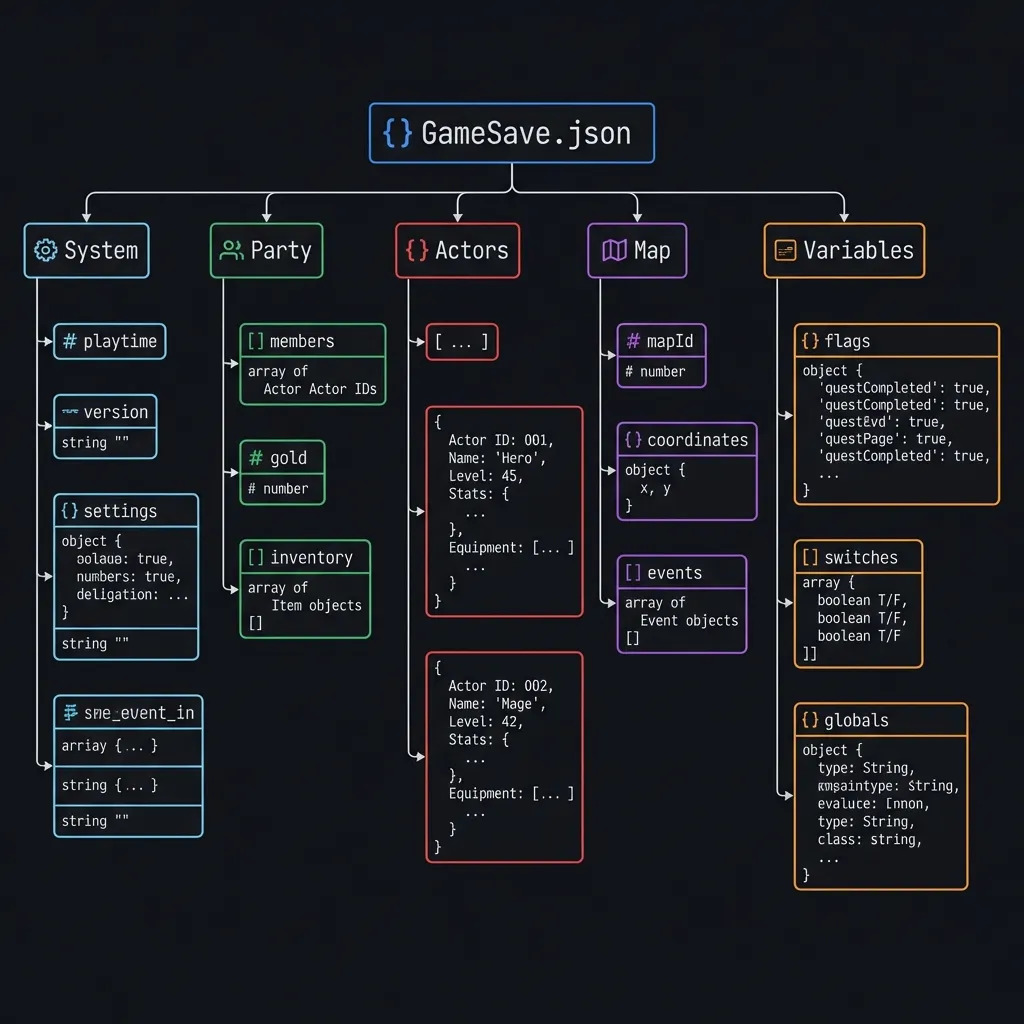
Basic Structure
{
  "system": { ... },
  "screen": { ... },
  "timer": { ... },
  "switches": { ... },
  "variables": { ... },
  "selfSwitches": { ... },
  "actors": { ... },
  "party": { ... },
  "map": { ... },
  "player": { ... }
}
Key Properties Explained
1. Party Data (party)
Contains the core gameplay state:
{
  "_gold": 5000,
  "_steps": 12345,
  "_items": { "1": 10, "2": 5 },
  "_weapons": { "1": 1 },
  "_armors": { "1": 1 },
  "_actors": [1, 2, 3, 4]
}_gold: Party’s money_steps: Step counter_items: Item ID → quantity map_weapons/_armors: Equipment inventory_actors: Actor IDs in party order
2. Actor Data (actors)
Individual character stats:
{
  "_hp": 500,
  "_mp": 100,
  "_level": 25,
  "_exp": { "1": 50000 },
  "_skills": [1, 2, 3, 10, 15],
  "_equips": [1, 0, 1, 0, 0],
  "_name": "Hero",
  "_class": 1
}
3. Switches (switches)
Boolean flags that control game events:
{
  "1": true,    // Example: "Met the King"
  "2": false,
  "10": true    // Example: "Boss Defeated"
}
4. Variables (variables)
Numeric values for game logic:
{
  "1": 500,     // Example: "Quest Progress"
  "2": 10,      // Example: "Items Collected"
  "5": 99       // Example: "Secret Counter"
}
Save File Locations
RPG Maker MV/MZ (Desktop)
[Game Folder]/www/save/
[Game Folder]/save/
Files are named file1.rpgsave, file2.rpgsave, etc.
RPG Maker MV/MZ (Browser)
Saves are stored in browser localStorage:
RPG [Game Title]RPG Maker VX Ace
[Game Folder]/Save/Files are Save01.rvdata2, Save02.rvdata2, etc.
How to Edit RPG Maker Saves
Method 1: Online Editor (Recommended)
- Go to our RPG Maker Save Editor
- Upload your
.rpgsaveor.rmmzsavefile - Edit values in the visual interface
- Download and replace the original file
Method 2: Manual Editing (Advanced)
For MV/MZ files:
- Open the file in a text editor
- Copy the Base64 string
- Decode with Base64 decoder
- For MV: Decompress with LZString
- Edit the JSON
- Reverse the process
Our online editor handles all this automatically!
Common Edits
Add Maximum Gold
Set party._gold to your desired amount (max: 99999999 typically).
Max Level All Characters
For each actor in actors, set _level to max and adjust _exp accordingly.
Unlock All Skills
Add skill IDs to each actor’s _skills array.
Complete All Quests
Find the relevant switches or variables and set them to the “completed” state.
Add Any Item
Add entries to party._items with the item ID and quantity.
MZ vs MV Differences
While similar, MZ has some enhancements:
| Feature | MV | MZ |
|---|---|---|
| Compression | LZString | None (raw JSON) |
| Auto-save | Optional | Built-in |
| Item format | Same | Same |
| Variable format | Same | Same |
Troubleshooting
”Save file corrupted” Error
- The JSON structure was broken during editing
- Restore backup and try again with smaller changes
- Use our online editor to avoid JSON syntax errors
Changes Don’t Appear In-Game
- Make sure you’re editing the correct save slot
- Some values are cached; may need to change maps or restart
- Check if the game has encryption enabled
Can’t Find Save Folder
- Right-click the game → Properties → Local Files → Browse
- For browser games, check localStorage in Developer Tools
Developer Tips
If you’re creating an RPG Maker game:
- Document your switches/variables - Keep a spreadsheet
- Use meaningful IDs - Group related switches together
- Test save compatibility - Edit saves to test edge cases
- Consider encryption - For competitive/multiplayer elements
Further Reading
Expand your RPG Maker knowledge with these related guides:
- 📖 How to Edit RPG Maker Save Files - Step-by-step editing tutorial
- 🎮 RPG Maker Games Page - Save locations for popular RPG Maker games
- 📂 Common Save File Extensions - Understanding .rpgsave, .sav, and more
- 🔧 RPG Maker Editor - The online tool for editing saves
- 🎭 Ren’Py Save Editing Guide - Another popular visual novel engine
Conclusion
Understanding RPG Maker save file structure empowers you to debug games, recover lost progress, or simply enjoy games the way you want. Whether it’s adding gold, maxing stats, or unlocking content, our free RPG Maker save editor makes it safe and easy.
Ready to edit? Open the RPG Maker Save Editor →
Last updated: January 2026
Related Articles
Ready to edit your save file?
Use our free online editor to modify your game saves instantly.
Launch Save EditorRelated Articles
How to Edit RPG Maker MV Save Files (.rpgsave) - Complete Guide
A complete guide on how to edit RPG Maker MV save files using our free online tool. Modify gold, stats, items, and variables easily. Works for MV and MZ.
How to Edit Unity PlayerPrefs and XML Saves - Complete Guide
A complete guide to modifying Unity game save files on Android, iOS, and PC. Learn how to edit PlayerPrefs, XML, JSON, and Plist files for any Unity game.